Showing posts with label facebook. Show all posts

Saturday, 22 October 2011

New facebook shop!


keychain

Yay for another place to find meerkatty goodness!

I've been hard at work this last week uploading (or is it downloading? I'm never sure!) meerkats into my new payvment shop on facebook.

Everything there will be ready-to-ship and if you've "liked" my page you get an automatic 15% discount. Prices are in lovely British ££££ and shipping is a standard £2, or £3 overseas.


brooch

New - and so far unique to facebook - are my tiny meerkat brooches and keychain! Most of your favourites will be there, but if the one you want is missing please get in touch and I'll stick it on my to-knit list.

Find my new shop by clicking HERE

Thursday, 27 January 2011

More Facebook changes

I've always found facebook a bit of a mystery but it's definitely got worse lately!

I blogged last month about how to stop getting email notifications.

Now they've switched me (and presumably all of us!) over to the new profiles and everything's changed.

The first thing I had to tackle was the little group of pictures at the top of the page selected from any and every photo that anyone had tagged with my name. Somehow, a photo of myself in bed opening Christmas stockings with my small children 20+ years ago is not what I want to look at every day! They're easy enough to "hide" though, you just hover the mouse over the pic and click the little x in the top corner. I also found several photos that I'd been spammed with (some sellers think it's a good idea to tag everyone they've ever heard of in a product pic - I call it a good way to get unfollowed)

I was then left with very few photos, so the solution was to tag myself in some photos I actually wanted to show - and we're there!


I'd been wondering why my News Feed seemed to have decreased, I hardly seemed to see anyone's news there any more. I found a very useful post from Mariann Rea which explained how to get my feed back: In order for you to view ALL the posts from your friends and pages that you have liked you need to do the following:
Go to the front page. Next to the news feed there is Most recent, click on that and choose Edit options. There you can change the settings to "show posts from All of your friends and pages"

I was now concerned enough to check my account settings (top right corner) - and discovered that my phone number and address had been reset so that they could be seen by all my "friends"! Seeing as I personally know maybe 6 of my hundreds of "friends" and "likers" I changed many of the privacy settings - and would urge you to check yours. I don't know for a fact that these were changed by the updated profile coming online - but I can't believe I'd deliberately set my phone number to be made public, I HATE talking on the phone at the best of times!

Any other daft changes you've noticed, please let us know in a comment. Thank you!

Friday, 31 December 2010

Facebook groups - how to stop getting all those emails!

The main mystery to me about facebook is why on earth they change stuff just when I think I've got the hang of it!

A while back I think there was an option to "invite" people to join a facebook group. The powers that be have changed that. There are now two ways to join a group - you can ask to join, or a member can add you to the group without asking you first.

Rather than add people, I'd like to invite you all to join the zibbet group. It's not just for Zibbet shopkeepers, it's for anyone with an interest in online selling/buying, and we like to chat!

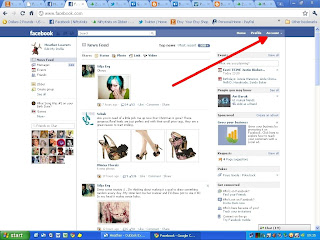
That brings up my next and very important point! Facebook has set the default account setting to notify you every time someone breathes or moves a muscle - and if you're like me, you don't need that number of emails! So here is a step by step "change my email notification" guide:

From your home page, click on "Account" in top right


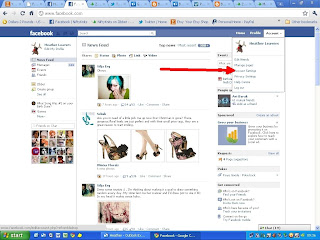
next click on "Account settings"


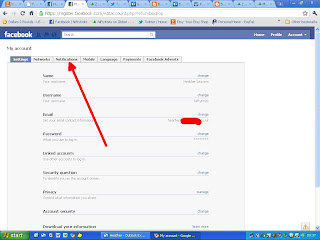
Then click on "Notifications" (ignore the red splodge, that's me hiding my email address. After all, the point of all this is not to get MORE spam LOL)


Select "groups"
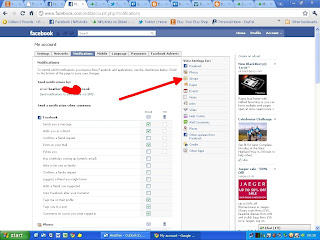


Scroll down to the groups section (you might want to uncheck some of the other sections for facebook notifications while you're at it)
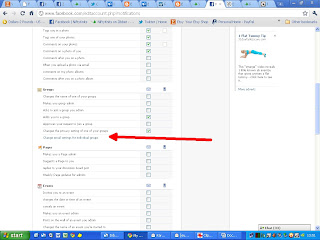


Click on "change email settings for individual groups"
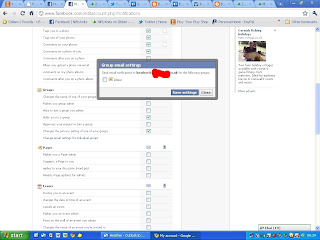


Uncheck that box - and you will no longer get emailed every time a group member posts. You will still be able to find new posts easily though, there will be a number at the top left of your page showing new posts:
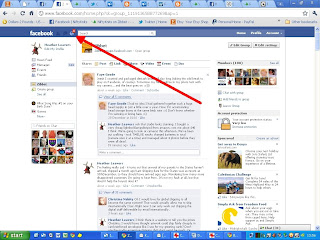


So - back to my starting point - please join us in the zibbet group

Tuesday, 3 November 2009

Ready, steady, GO!

>


It's OK - knitted meerkats do *NOT* suffocate.

The journey has now begun - each little meerkat has set off on a world tour, visiting 30 (yes, THIRTY!) different members of Etsy's ETTEAM.


The various hosts will each be doing something exciting which will be blogged for you, we will be keeping track of their adventures here, and on our ETTEAM blog and even on their very own Facebook fanpage!

I wonder where they'll turn up first?

Check out ETTEAM's blog later for more details on what this is all about.

Friday, 18 September 2009

YAY me! I win again!

A wile ago I entered a fiendishly difficult (but great fun!) contest on Laughing Daisy's blog. She showed us a picture of her button collection in which she'd hidden some birds - anyway, it brought my competitive nature to the fore and yesterday my prize arrived. I wasn't expecting anything like this much in the package!


There are some hairclips made from fabric-covered buttons, another couple of funky plastic hairclips, very retro! a temporary tattoo with which to horrify my grown-up kids, a dear little gift bag, a couple of gift tags, introductions to various new shops ... and some American candies!

Many thanks Mindy!

Please check out Mindy's shop LaughingDaisy
become a fan on facebook (I just have!)
encourage her to get going on twitter!